Password protect image files on Mac
Posted in
Images of tax, banking or wire transfer forms containing sensitive information can easily be viewed by anyone with physical or remote access to your machine. Unfortunately, macOS Preview doesn’t support file-level password protection, but there is a quick workaround that don't require third-party software.
By converting your graphics file to a PDF, you can unlock a handy password feature tucked away in its settings, turning your image into an encrypted password-protected PDF. This takes just a few seconds.
• Right-click the image you want to password protect, hover over “Open With,” and choose Preview
• Go to File > Export...
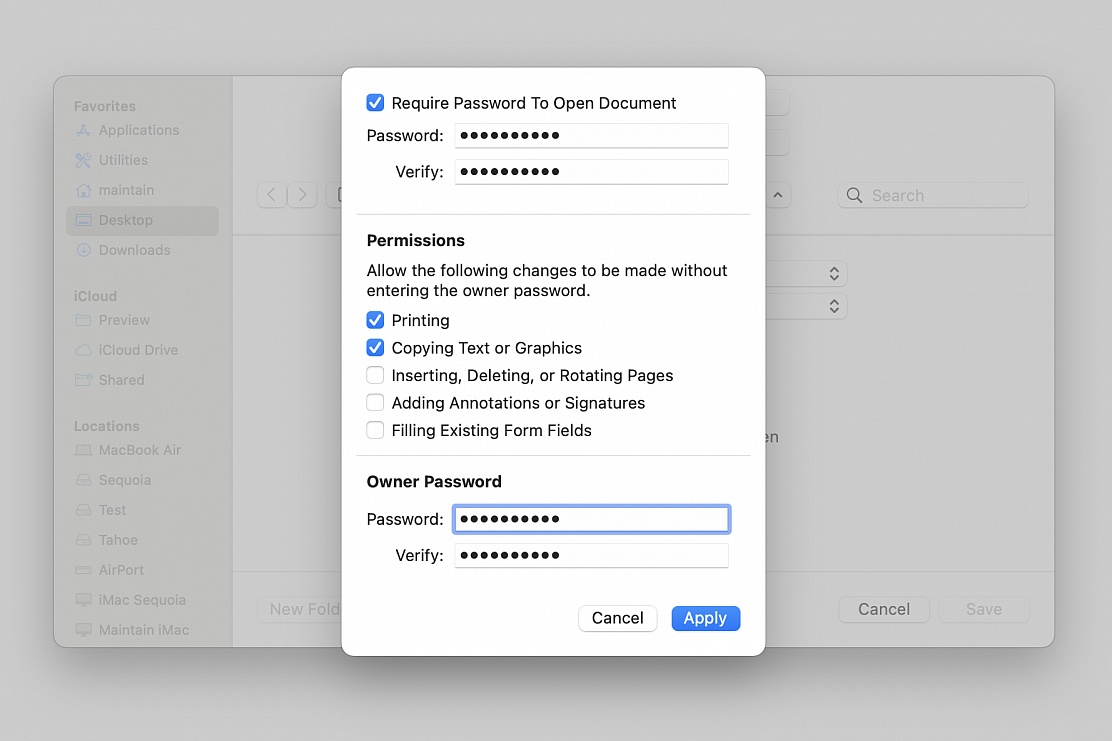
• Name your file, choose its location on your machine, choose PDF as format and click "Permissions..." to give you more options, including the one to add a password to the file
• Check the “Require Password To Open Document” box
• Enter the password
• Set permissions to allow actions and/or changes to be made without entering the "Owner Password"
• Enter the "Owner Password" required to allow any actions and/or changes not selected in the Permissions section
• Click on “Apply” and then click “Save”