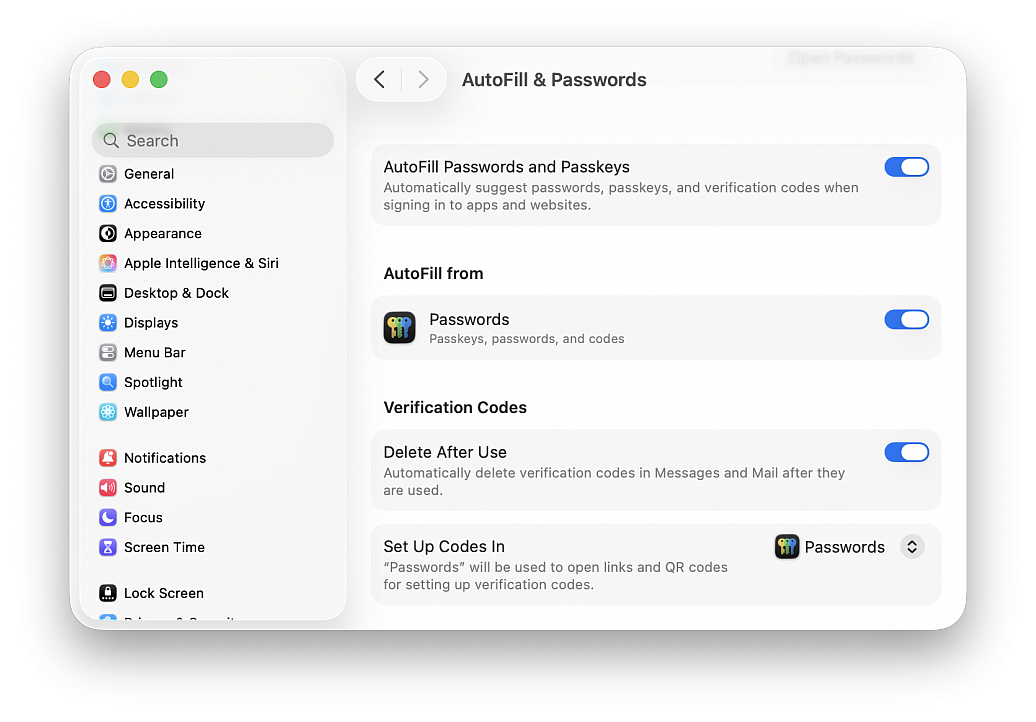
Tidy up Messages and Mail by auto-deleting verification codes
Posted in
Many services use two-factor authentication nowadays, where your phone or email address gets sent a code that you must enter as part of the login process into an online service. These codes are one time use only and therefore don’t make a lot of sense to keep around forever, but manually going through and deleting all those verification codes from Messages and Mail can be annoying.
Apple has realized the endlessly piling up verification codes clutter is a hassle, and has created a handy optional feature that allows the operating system to automatically go through and delete those verification codes after they have been successfully used. This optional setting is particularly great when used in combination with the automatic security code fill feature available to macOS.
• From the Apple menu go to “System Settings...”
• Go to “General” and then choose “AutoFill and Passwords”
• Under the “Verification Codes” section, toggle the setting for “Delete After Use”
With this feature enabled on the Mac, your verification codes will now automatically be deleted after they have been used.