Launchpad alternatives for macOS Tahoe
Posted in
macOS Tahoe has killed Launchpad, but if you miss it, here are two alternatives to Launchpad that you can use to see Mac apps in one spot and open them quickly.
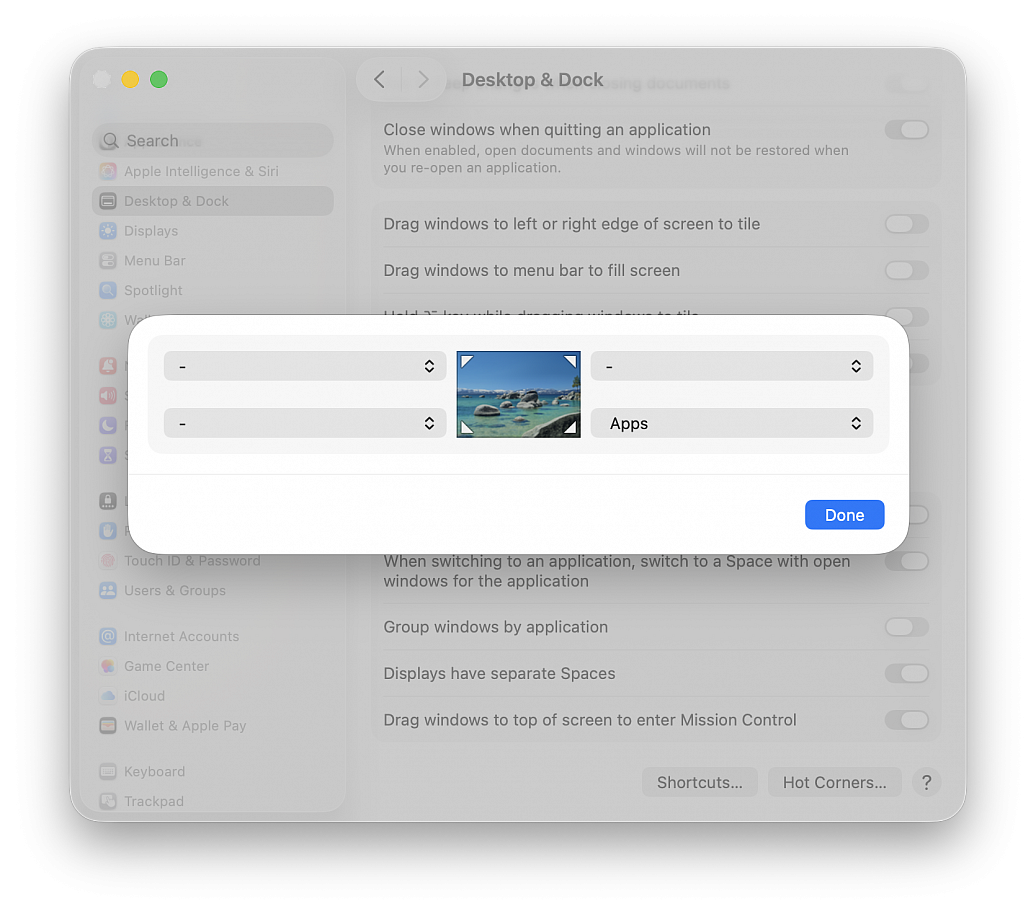
Add Apps to a Hot Corner. Setting up Hot Corners is very easy:
• Go to the Apple menu and choose "System Settings..."
• Click Desktop & Dock in the side column
• Click the Hot Corners... button at the bottom of the menu
• In the dialog that appears, click the chevrons to open the dropdown menu corresponding to the screen corner that you want to use and assign this corner to Apps, then click Done
• Now, you can open the new macOS Tahoe Applications overlay by taking the pointer to that corner of the screen
Add an Applications folder to the Dock:
• Open a Finder window
• Right-click over Applications in the sidebar and select Add to Dock
• An Applications shortcut will be added to the left of the Trash icon, click it to view all apps and open one (you can also right-click on this icon and change a few things)