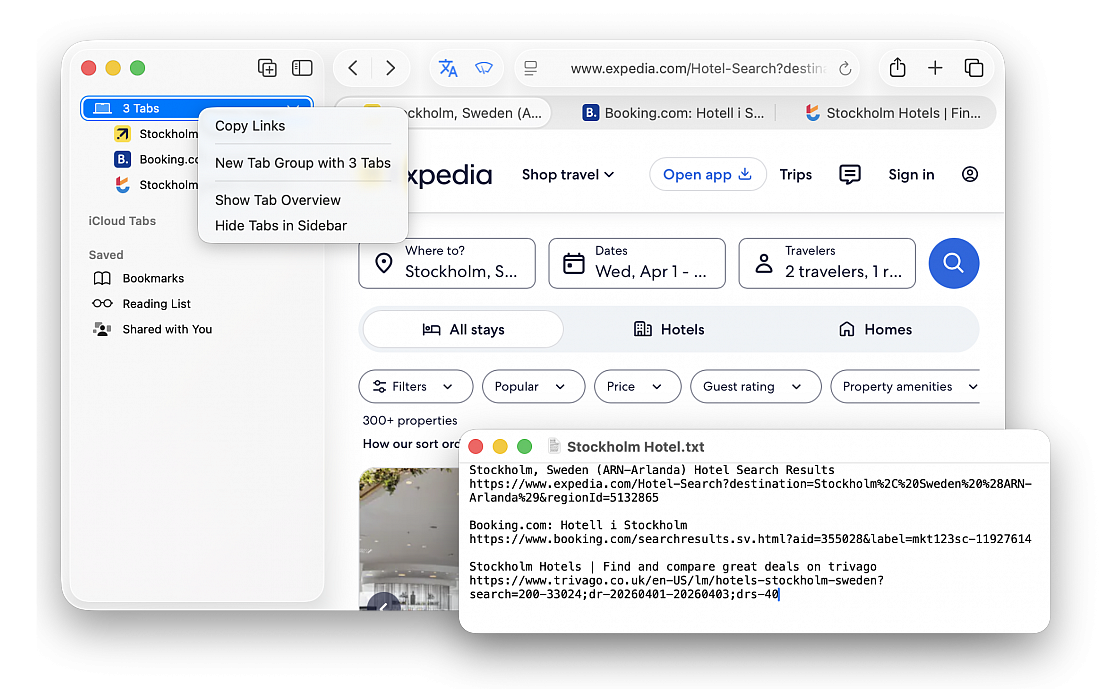
Copy website links of all open tabs in Safari
Posted in
Find out how to quickly copy the URLs of all currently open websites in Safari on Mac so you don’t have to copy them one by one.
Whether you’re for example browsing Amazon and have opened a bunch of product tabs that you need to share via Messages or have several tabs open for your research work that you want to add to your document, you can simplify this process by copying all open website addresses in one go. As a result, you won’t have to manually copy each open link, paste it, and then repeat this process back and forth for the remaining tabs. A couple of clicks and all open URLs will be copied to your device’s clipboard for pasting into other apps.
• Make sure you have the relevant tabs open on Safari
• Click the sidebar icon in the top left corner of the window or press the Shift+Command+L to show the sidebar
• Right-click over the profile or Tab Group name and choose Copy Links, all URLs of open tabs will be copied to your Mac’s clipboard
Now go to Notes, Messages, Mail, Pages, Word, or another app, and paste the links there. When using Command+V to paste in an app that supports rich formatting, you’ll notice that the website name with the URL linked to it is pasted. But if you use Command+Option+Shift+V to paste without formatting, or paste them normally in an app like Messages, you’ll have both the website name and the full URL in plain text.